

July 6, 2026
Webinar Recap: What AI Actually Did for Our Prospecting Motion
Everybody's talking about using AI for sales right now, but it’s really hard to split the hype from the reality. At Operatus, we've spent months building AI into our outbound motion, and we wanted to tell our real story.
So we got the Understory crew together for a webinar to walk through exactly how we do it, step by step, from the very first setup all the way to a booked discovery call.
Below is the whole process.
1. Before your start, give your Agents context
If you are even starting to think about using AI for any of your sales tasks, the first thing you need to do is build a repository of all your key information an agent needs to execute the task. Think of it like onboarding. You need to train AI, the same way you train an new employee.
We built an AI “brain” at Operatus and here is what it included:
- Company context: what you do, your positioning, your mission and how you talk about yourselves, plus any history or proof points (case studies, named wins) an agent should know.
- Customer context: Who you ICP, what are their attributes, what are their challenges
- Competitive context: What makes you different
- Messaging: Company bio, core benefits, services
- SALES PROCESS: In bold because, this gets skipped too often. If you want agents running real workflows, they've gotta know your lead statuses, your opportunity stages and what each one means, what happens at every stage and who's doing it, which systems you use, who owns what, and where the approval steps live, etc. You catch the drift. Agent use is not an excuse to skip documenting your process.
To create the reference file, Notion works, Supabase works, and honestly even a plain markdown file in Claude Code works. You can fit way more into a markdown file than you'd think, and Claude will save context into it and reuse it forever.
We built ours as a GitHub repo because it keeps everything structured and gives the whole team one source of truth to point their agents at. I know it sounds scary but it’s not. Trust me, I haven’t coded since 2011 and I was able to build a local MCP server to host it for Claude to access it.
Some tips we learnt along the way:
- You need to distinctly mark information that is for internal use only. You don’t want an agent disclosing sensitive information to a customer.
- Each entry needs to include who reviewed it last and when.
- This will force your team to write processes down (this is often the hardest part).
2. Segment your leads
One thing AI does really well is let you target different messages at different segments. This isn't your grandma's personalization token. It helps you find a person with a problem and then say something real about that problem. But, only if you start thinking about segmentation differently.
In the webinar, Andrew framed a segment as an observable data point you can use to infer pain, not an attribute.
- An attribute is a feature of a company: employee count, location, even a person's job title. Good to know, but it doesn't really tell you about their problem.
- An observable data point is a specific signal, or a group of signals, you can spot to infer a pain.
So how do you find the data that points to pain? You have to make an educated guess based on what you know about your customers. AI just helps you gather the data to support your hypothesis:
- Start from your big addressable market, then carve subsegments inside it.
Everyone who uses Salesforce may be too broad but that can be sliced down into Salesforce users with a specific problem. Example: Companies using salesforce and hiring 2 RevOps team members with Agentforce Revenue Management experience (hint: they might need some help with CPQ-to-ARM migration) - You can build those slices from real evidence. Pull from what customers actually say in your intake and sales calls, and even from the pains people vent about on Reddit.
- Add multiple data points together that tell a story. Say a company uses a CRM, Zapier and an ERP. That could indicate a bandaid solution.
- Match a value prop to each segment instead of reusing one. Hiring for a RevOps role? Lead with the fractional-cost angle. Duct-taped stack? Lead with the case study where you untangled the same mess.
3. Once replies start rolling in, use them to iterate
Okay, so your message is out the door and replies are coming back. Sorting through replies is where AI can be super helpful. For us, Andrew wired Claude into our sequencer to read replies directly and made some quick discoveries:
- First, the winning CTA wasn't the one we'd have bet on. In our sequences, asking "can I just send you a video?" beat sending a document or asking for a meeting outright. I've seen people wondering why so many SDRs are sending Looms right now, and it's because it is generating replies.
- Second, reading through the "not interested" pile showed that 16% of those folks don't even use the tech we were targeting. That pointed to a list-building problem, not a problem with the message itself.
The lesson: READ your replies. Or better yet, have Claude do it. Here's how
- Feed your sequencer's reply data to Claude. You can connect it directly, or even just export and upload them if you don’t know how.
- Ask it to break positive replies down by step, then move your winning low-friction step toward the front and shorten the sequence.
- Have it bucket the "not interested" replies by reason.
4. Enrich leads in two rounds so you're not lighting money on fire
In an ideal world, your sales team wants every piece of data about a lead they can get their hands on. But nothing in life is free, baby. Luckily, with a little strategy, you can keep the cost under control.
Christine built our enrichment flow to do exactly that:
- Validate before you spend a thing. Check that the domain's real and clean, since that's the foundation everything else builds on. No point enriching a bad record.
- Run round one through your low-cost, credit-conscious providers, and add a check that flags any record still missing data.
- Route only the flagged gaps to a pricier provider in round two.
This way you only pay premium rates on just a handful of holes instead of the whole list.
5. Write the account summary straight back into the CRM
Now that the data's clean, we have AI write an account summary and drop it right back into Salesforce, so sellers read one tidy overview instead of digging through the whole record.
The key here is to prompt the AI to deliver results in a standardized format, so your sales team always knows exactly what to expect on a lead.
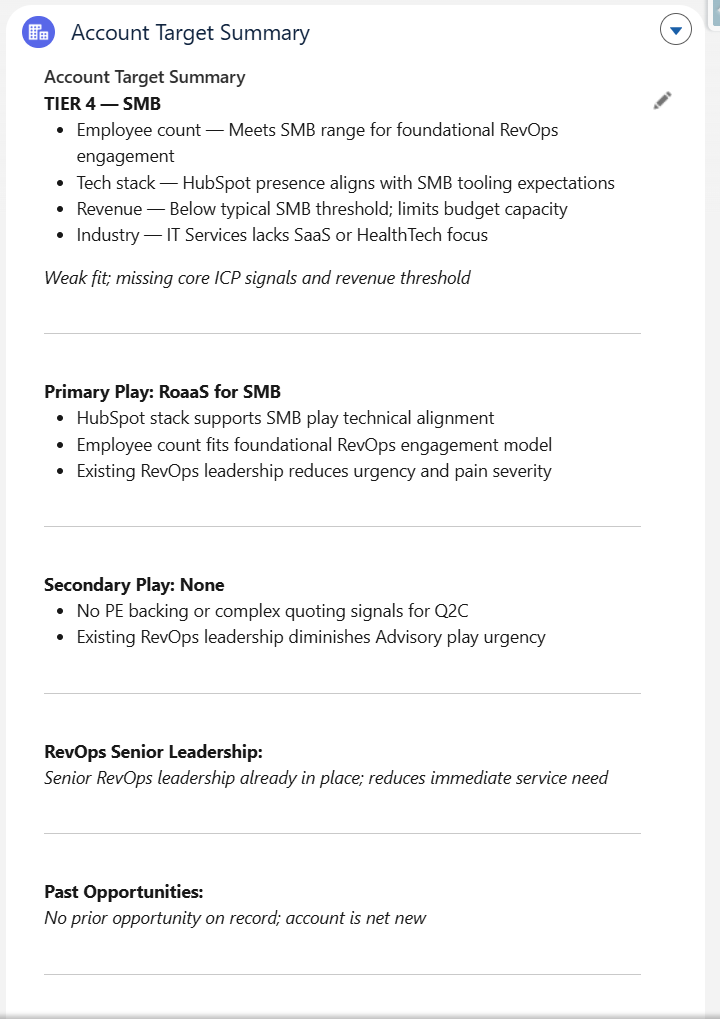
Our includes:
Tier: This is shown first because it helps the team triage the leads that are coming in but order of importance.
Primary Play: This suggests the challenge (and relevant service to solve that challenge) that the team should focus on in their messaging to this lead.
Secondary Play: Any other challenges or services we think might be relevant to this company.
Key Team Members: Highlights any leadership team members that may be in the decision making process.
Past Opportunities: Surfaces if we have ever engaged with them in the past.
Your fields might be different, and that's fine. The important part is putting the data in a structured way, right where your sellers already live.
6. Templatize call prep into a skill to prep faster
Once the lead is booked in, AI can also help with the prep ahead of the call. So you already have your enriched record in the CRM but that can also be transformed into a document with everything you need specifically related to the call.
We pull from:
- The calendar invite which grabs the company and who's on each side.
- Salesforce accounts, opportunities, and contacts, then Slack deal rooms, Gmail for anything sent ahead, and any prior meetings.
- And then only reach for external enrichment if there are still gaps.
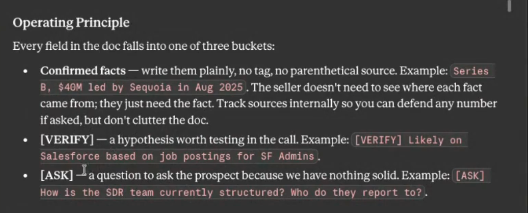
This creates a call prep document that has three key categories:
- Confirmed facts: things we know to be 100% true about this prospect. Ex.They just raised a Series B in April 2025.
- Things to verify with the client: stuff we're assuming but need to check, like the specific challenges we think they're facing.
- Discovery questions to ask: the things you'll actually dig into on the call.
That's at LEAST an hour of prep you used to grind out by hand, now something you skim in five minutes and still walk in sharp.
Let's build yours
So that's the whole motion, start to finish. Build the brain, segment your leads, read your replies, enrich smart, summarize for your sellers, and prep for the call. And notice what AI didn't do anywhere in there. Most of the writing and talking to clients. For us, AI really helps sort and summarize data so our team can move faster.
If you're building something like this and want a second set of eyes, reach out! This is the cutting edge RevOps stuff we love talking about.
Table of Contents
.svg)
.png)